THINMANAGER HOME LICENSE ACTIVATION PLATFORM MAINTENANCE DOWNLOADS NEWSLETTER
chat Send an Email chat Sales: 1-877-239-4282 chat Support: 678-735-7432      RSS  youtube  twitter  linkedin  facebook
 
tagline        companies         Inc 500


SPECIAL NOTE: As of the release of ThinManager 6.0 on May 1, 2012, ACP is announcing the end of life for ThinManager versions 3.1 and earlier.

v6

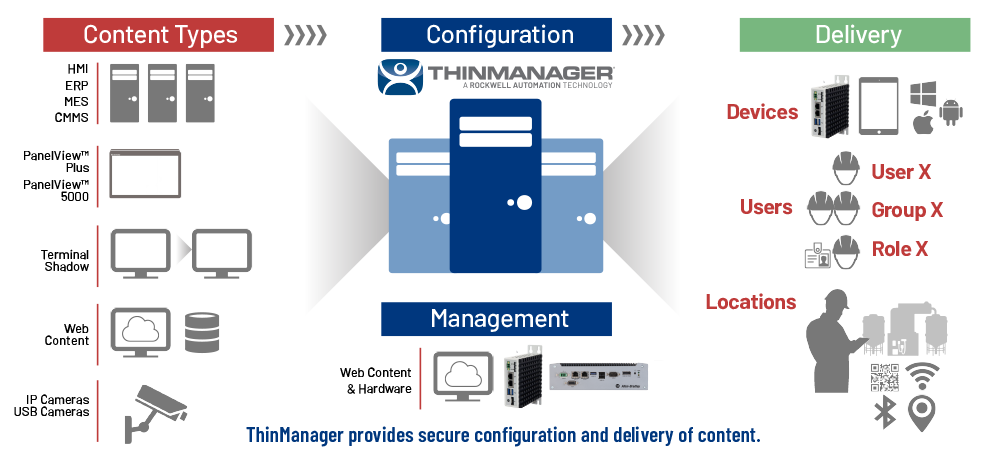
ThinManager offers centralized management solutions for the modern factory & office by simplifying management of applications and visual sources.

ThinManager allows unprecedented control and security in a sustainable and scalable platform regardless of the size of your industrial environment or number of facilities. ThinManager's thin client architecture allows for deployment of less expensive hardware while giving users the applications and tools familiar to them in a format that reduces management and hardware costs while increasing security.

By acting as a centralized management solution, ThinManager will seamlessly integrate with your current PLC’s and HMI while providing a number of features, tools, and methods of access, which make it simple to monitor and adjust user sessions from anywhere.

hubspot video

ThinManager display clients can be generated by a session running on a display server (e.g. a Terminal Server, a shadowed thin client, an image from an IP camera, or VMWare® virtual machines). Administrators can allow multiple user sessions to operate at the same time and each can be viewed and/or controlled directly from ThinManager or from any authorized thin client terminal on the network.

ThinManager renders display clients through a number of different types of thin client hardware available from multiple manufacturers and offers the ability to expand the number of sessions, which can be simultaneously viewed from any designated work station.

Built on a MultiSession Core

multisessionThinManager offers technology for IT professionals seeking better security and configuration of their thin client networks. Our MultiSession core technology allows multiple sessions running anywhere on the ThinManager network to be viewed through one thin client.

ThinManager can "tile" these screen views based on your settings. You can dictate which tile shows which session. You can set it to run in screensaver mode so that certain "tiles" are constantly updated with different sessions. Multisession allows you to view displays from different applications on the same monitor.

 
What's Next?


Quick Links

Platform Maintenance Plan »
Our full-featured platform maintenance plan.

SmartSession »
Management of Servers and Clients.

VM Resource Management »
Centralize & manage virtual machines.

ThinManager Mobile Apps »
Use ThinManager on-the-go.

MultiMonitor »
Use up to 5 monitors with 1 thin client.
Learn how MultiMonitor was created »

TermSecure »
Increase security and boost productivity.

IP Camera Support »
ThinManager provides support for IP Cameras.


Built for a Virtual Environment

tmvmMore than 12 years ago ACP completely changed the modern factory floor by pushing industry to adopt thin client technology instead of continuing to waste time and money on configuring and managing PCs. Today we are bringing this same idealogy into IT and control room environments by utilizing virtualization to consolidate server hardware resources to save even more time and money by easing the burden of server management.

Click here to read more about
ThinManager's virtualization support.

Manage IP Cameras

ipcameraManage IP cameras from within ThinManager's easy-to-use interface. Visualization of factory floor resources is simple to setup and deploy using ThinManager.

See camera feeds full screen or set them as an overlay to your HMI or other plant floor application.

Click here to read more about ThinManager's IP Camera
management ability.

ThinManager runs on iOS Devices!

iosThinManager's powerful features are available in a portable format for iOS devices. Setup, configure, and manage clients directly from an iPhone or iPad.

iosappstore
Click here to read more about
ThinManager's iOS app.

How ThinManager Works...

Display clients can be generated by a traditional session running on a Terminal Server, a shadowed thin client, an image from an IP camera, or VMWare® virtual machines. The sources of these displays are referred to as Display Servers.

ThinManager's MultiSession core technology allows you to view multiple display clients with a single thin client. Using session tiling you can now view up to 25 Display Clients on a single monitor.

TermSecure extends this functionality even further by allowing you to link display clients to a user instead of to a particular thin client. Users can then access their own display clients simply by logging in to any ThinManager Ready thin client.

ThinManager renders display clients through a number of different types of thin client hardware available from multiple manufacturers.

 
platform5


Some of the benefits of ThinManager and ThinManager Ready thin clients are:

Centralized Client Configuration
Centralized Management
Quick Replacement
ThinManager allows ThinManager Ready thin clients to be configured in a central location instead of individually at each client. ThinManager allows the monitoring of the thin client from a central (or remote) location. ThinManager shows what thin clients are operating, what terminal servers they are assigned to, whether they are logged in, and even what applications they are running. ThinManager Ready thin clients can be replaced with a single click of the mouse, with the new unit assuming the old unit’s identity and displaying the old unit's session.
px
Reliability
E-Mail Event Notification
Support for both RDP and ICA
ThinManager Ready thin clients are more reliable due to the lack of a hard drive or other moving parts and can be replaced with a single click, while a PC or fat client requires hours of installation and configuration. ThinManager can be configured to send e-mails or a local message to a designated operator's console when the specified event occurs. ThinManager Ready thin clients can use the native Microsoft RDP protocol or the Citrix ICA protocol to communicate with the Terminal Servers.
px
ThinManager Windows Client
MultiMonitor (Multiple Monitor Support)
TermSecure
wintmcxli ACP has a Windows client for installation on PCs that will allow the PC to become a fat client. This Windows client supports ThinManager and features a multitude of standard features, as well as Modules, which can be downloaded directly to your ThinManager server. multimonitorxli Several ThinManager Ready thin clients are available with multiple video ports, allowing up to five monitors to be connected to one thin client. These monitors can run individual sessions or can be configured to merge into double-wide and triple-wide sessions. Available with XLi License.
[more info] Learn how MultiMonitor was created »
termsecurexli Increase the effectiveness of your ThinManager Ready thin client network by adding users to your management tree. Control user access with a ThinManager manual login, or use proximity cards and/or USB flash keys. Grant or deny user access to thin clients, terminal server applications, and sessions with permission groups. Available with XLi License.
[more info]
px
Click here to view all standard features of ThinManager

thinmanager modules


acp logo       ©2013 Automation Control ProductsAbout ACPSupport Solutions MediaPrivacy PolicyTerms of Use